The Invisible Data in Your Photos (And Why You Should Scrub It)

When you take a photo with your smartphone, you are not just capturing an image. You are capturing data. Embedded inside that image file is a hidden layer of information that reveals more about you than you expect.
This hidden layer is called EXIF data. As the CIPA (Camera & Imaging Products Association) documents, the Exchangeable Image File Format standard embeds metadata that can include:
- The exact date and time the photo was taken
- The camera model and settings (ISO, shutter speed, aperture)
- GPS Coordinates: The precise longitude and latitude of where you were standing
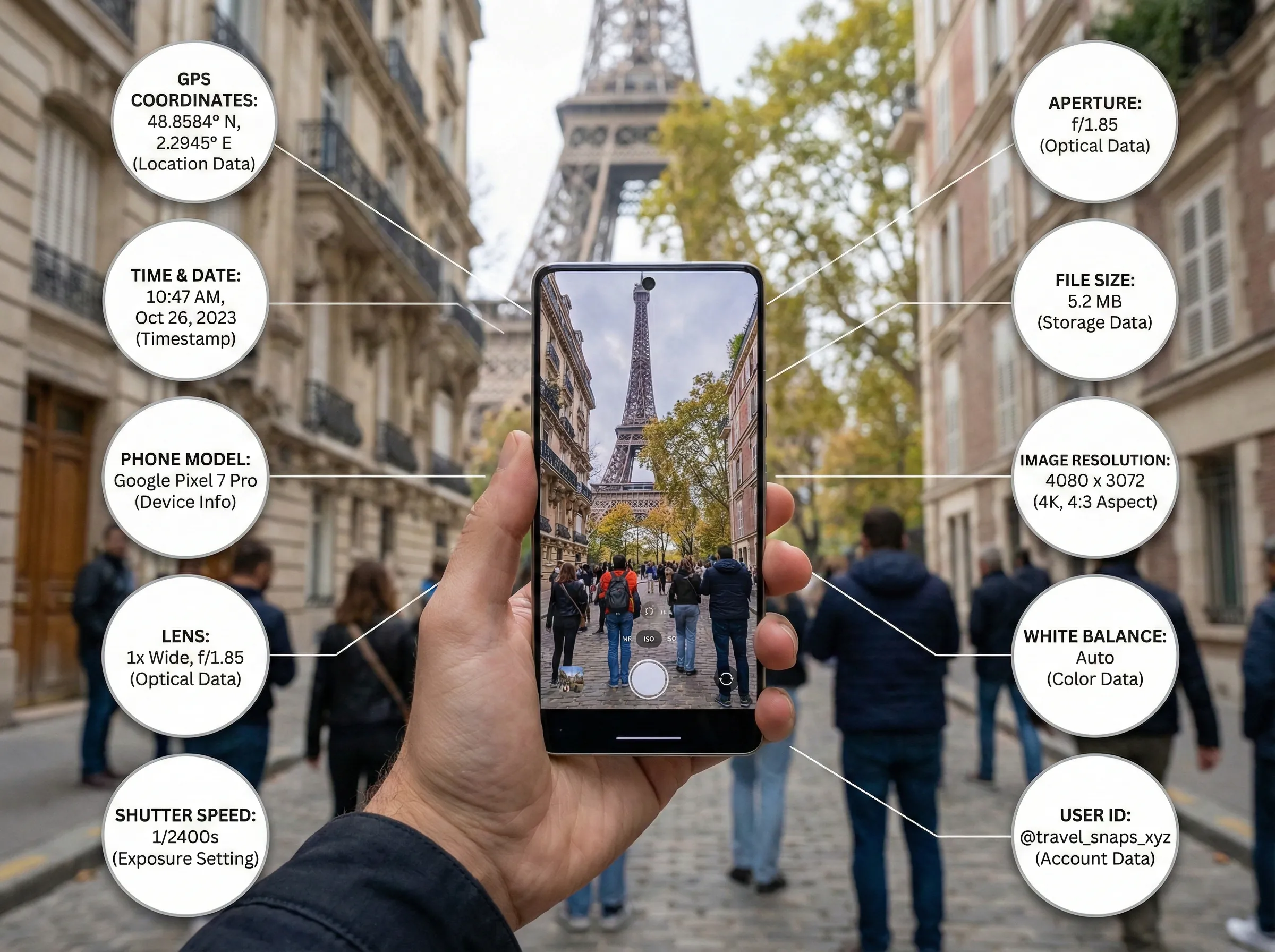
The Privacy Risk
Consider a common scenario: you upload a photo of your expensive bicycle to a forum to sell it. Or you post a photo of your children playing in the backyard to a public blog. A savvy user can download that image, view the EXIF data, and potentially see exactly where you live.
According to Meta's Help Center, Facebook and Instagram strip EXIF data from uploads automatically. But if you are uploading to a personal blog, a forum, or sending a file directly to someone, that GPS data often stays attached.
Other places where EXIF data commonly survives:
- Personal websites and blogs
- Forums and community boards
- Direct email attachments
- Cloud storage sharing links
- Small e-commerce platforms
Compression as a Privacy Shield
One of the side benefits of image compression is that it acts as a digital "shredder" for this metadata.
When you run an image through LighterImage, our algorithm focuses on the visual pixels. It considers the "hidden" text data, like the camera model and GPS location, to be unnecessary weight. As a result, this data is stripped out during the compression process.
This reduces the file size (which is the main goal), but it also sanitizes the file. You end up with a photo that looks great but does not carry a map to your front door.
It is a simple, passive way to improve your digital security without installing complex encryption tools or manually editing file properties.
A Practical Workflow
Before sharing any photos online, especially those taken at your home, workplace, or other sensitive locations:
- Drag your images into LighterImage (you can process up to 30 at once)
- Download the compressed versions
- Upload the clean, lighter files to your blog, forum, or marketplace
You get smaller file sizes for faster uploads, and the peace of mind that your location data is not traveling with your photos.
Frequently Asked Questions
What is EXIF data and why is it a privacy risk?
EXIF (Exchangeable Image File Format) data is hidden metadata embedded in photos, including GPS coordinates, timestamps, and camera settings. It's a privacy risk because anyone who downloads your photo can potentially see exactly where and when it was taken.
Does image compression remove EXIF data?
Yes. Most image compression tools, including LighterImage, strip EXIF metadata during the compression process. The algorithm focuses on visual pixel data and discards the hidden text data like GPS coordinates and camera information.
Do social media sites remove EXIF data from uploaded photos?
Major platforms like Facebook and Instagram automatically strip EXIF data from uploads. However, personal blogs, forums, direct file sharing, and many smaller websites do not remove this data, leaving your location information attached.
References
No signup required. Compress up to 30 images at once and strip metadata automatically.